
The bounty board at /bounties is the live public view of the Immortal Realm bounty system. This page covers how to read it — what each section means, what the status tags imply, and how to use the board as a hunter, patron, observer, or target.
For the underlying system mechanics (how bounties work, what gets filed and why, how imprisonment and parole flow), see Immortal Realm Bounty Hunting. This guide is specifically about the board itself.
What the Board Shows
The bounty board has several distinct sections:
- Active Writs — every writ currently posted, grouped by branch.
- Prisoner Roster — characters currently imprisoned through the bounty system.
- Hall Records — historical archive of significant bounty events.
- Rankings — top hunters and top patrons.
- Personal Writs Summary — visible only when logged in; your filed writs and writs targeting you.
Each section is independent. You can land on the board for any reason and find what you need without scrolling through the others.
Reading a Writ Entry
Every writ entry surfaces:
- Target. The character name. Some writs include last-known location.
- Branch. Player Writ / Crown Writ / Prestige Writ.
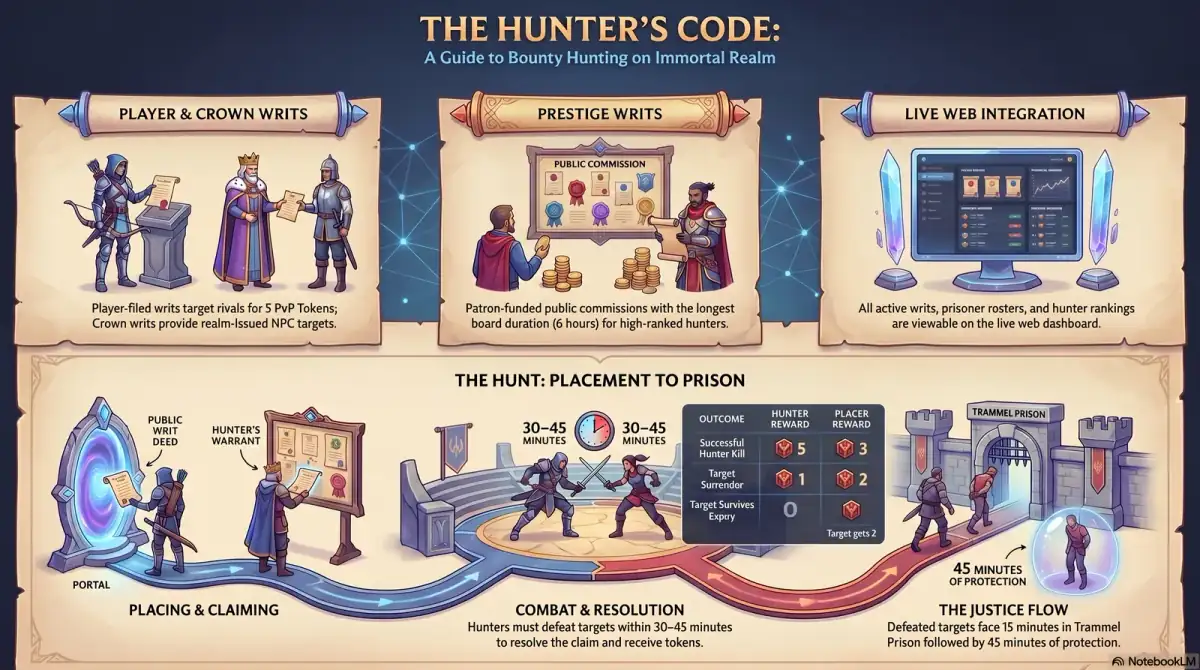
- Reward. Pursuit tokens paid to the hunter on successful claim — realm-paid, not funded by the placer. Player Writs pay a flat 5 PvP Tokens; officialized writs (Ledger Arbiter co-sign) and other branches carry their own values.
- Filed by. For Player Writs, the placer's character name. For Crown Writs, the realm. For Prestige Writs, the patron.
- Filed. When the writ was posted.
- Term remaining. How long the writ has left on the board.
- Status. See the section below.
- Notes. Optional public-facing notice text ("Public claim filed for lawful pursuit", or whatever the system or placer attached).
Hunters scan the branch, target, and term remaining first — the reward is fixed within each branch, so the choice is about what's still available and what's worth your time.
Filtering by Branch
The board lets you filter by writ branch:
- Player Writs — placer-filed via the Public Writ Deed. Volume is highest here. Filing fee is 5,000 gold flat (placer pays from bank); reward is 5 PvP Tokens (realm-paid, fixed); board term is 120 minutes (2 hours). An 18-hour pair cooldown applies between repeat filings against the same target by the same placer.
- Crown Writs — realm-issued, official-warrant targets. Lower volume but higher prestige. Board term: 150 minutes (2.5 hours). Crown Hunter rankings build entirely from this branch.
- Prestige Writs — patron-issued, public-attribution commissions. Lowest volume; longer term. Board term: 360 minutes (6 hours). Often tied to ongoing player politics.
Hunters specializing in one branch tend to filter accordingly. Crown Writ specialists watch only the Crown branch; volume hunters watch Player Writs; reputation-focused hunters watch Prestige.
Status Tags
A writ has two state dimensions: whether it's still Active on the board, and — when resolved — which Resolution closed it.
While active:
- Unclaimed — the writ is open. Any qualified hunter can take it from the Board with a Hunter's Warrant.
- Claimed — a hunter has accepted the writ. The hunt window is running; only that hunter can collect the kill bounty until the window closes.
Closed writs carry one of seven resolutions (verified from the WritResolution enum):
- Fulfilled — the hunter killed the target. Tokens awarded; entry moves to history.
- Surrendered — the target yielded to the Warden. Placer receives 2 pursuit tokens; the active-claim hunter receives 1.
- SentenceServed — the imprisoned target served out their 15-minute sentence with no bail or parole intervention. The writ closes against the placer; no kill credited.
- TargetDefended — the target killed the pursuing hunter during the hunt window. The writ closes; the target is rewarded with the realm-paid expiry bounty.
- Expired — the term ran out without a successful kill or surrender. No reward escrow returns (there isn't one); the 5,000g filing fee is not refunded.
- Invalid / Withdrawn — system-side resolutions for writs voided by anti-abuse checks or other system actions.
Hunters watching for opportunities filter on Active+Unclaimed. Observers tracking shard politics often watch Fulfilled, Surrendered, and TargetDefended for the historical view of what's been happening.
Prisoners and Hall Records
Two related sections.
Prisoner Roster
Lists every character currently imprisoned through the bounty system. For each:
- Character name, account-level reference (where public).
- Sentence length, time served, time remaining.
- Bail status — whether bail has been posted, by whom.
- Parole status — whether parole has been granted, conditions if any.
This is mechanically useful for two parties: bail-posters considering risk, and players whose targets are currently incarcerated and therefore unavailable to fight.
Hall Records
The historical archive. Entries are durable: significant bounty events (notable claims, contested resolutions, named targets) are preserved here even after the active writs they came from have rolled off.
Hall Records is the closest thing to a shard newspaper for the bounty system. It's worth scrolling occasionally to see what's been happening even if you're not actively hunting.
Rankings
Two ranking ladders.
Hunter Rankings
Top claimants ranked by writs claimed. Filterable by branch — overall, Player-only, Crown-only, Prestige-only.
A high Hunter ranking is real shard reputation. The shard is small enough that the top of the list is named individuals other players know about.
Patron Rankings
Top funders ranked by total gold paid out into successful Prestige Writs. Top patrons are publicly visible.
Patron status is its own prestige axis. A guild leader who consistently funds high-value Prestige Writs becomes known for it; the rankings make that visibility official.
Your Personal Writs Summary
When logged in, the board adds a Personal Writs section showing:
- Writs you've filed (status of each).
- Writs targeting you (active, with rewards visible).
- Your hunting history if you're an active hunter.
- Your patron history if you've funded Prestige Writs.
This is the operational view for any active participant. Filers track their writ outcomes; targets watch for new posts; hunters track their claim history.
A Practical Reading Pattern
If you're new to the board:
- Check Active / Player Writs first. This is the volume layer; you get a sense of what kinds of grievances are being filed and at what reward levels.
- Look at Crown Writs. Smaller list, higher stakes. These are the realm's official targets.
- Glance at Hall Records. Read the most recent significant entries to understand what's been happening on the shard.
- Check Rankings. Top hunters are usually worth knowing by name; top patrons signal which guilds are politically active.
- If logged in, check your Personal Writs Summary. Especially as a returning player — see if anything's been filed targeting you while you were away.
For hunters specifically:
- Filter Active by branch you're focused on.
- Sort by reward descending.
- For each promising writ, read the notes and check the target's last-known location.
- Decide: pursue now, watch, or skip. Pick one or two to actively hunt.
- After successful claim, file in-game and watch the board update.
How the Board Differs From the System
To be clear about the layer separation:
- The system is the in-game bounty hunting mechanics — filing writs, hunting targets, capturing them, imprisonment, parole. That's covered in Immortal Realm Bounty Hunting.
- The board is the web-side view of the system's current state. The board doesn't do anything — it shows what the system has done.
- The High Ledger is the institutional layer that backstops the system — Crown Writs, parole filings, contract enforcement. That's covered in High Ledger Guide.
You read the board to know what's happening. You act in-game to change what's happening.
The live board is at /bounties. The download page is the on-ramp when you're ready to play.
Visual reference
Click to enlarge.