
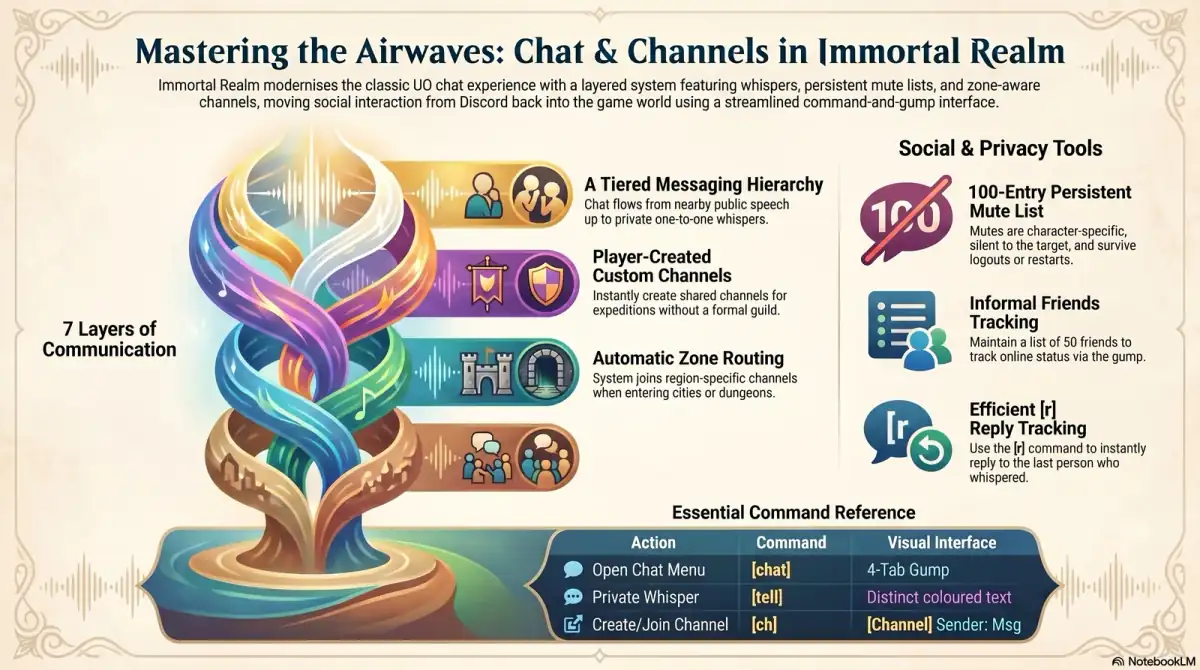
Immortal Realm's chat is a gump-first system. The whole layer is driven by the ModernChatGump — a self-contained chat client with four tabs (Send, Channels, Friends, Mutes). Once open, everything you can do in chat — send messages, switch channels, add or remove friends, mute or unmute, search for players by name — is doable from the gump's tabs without typing a command.
This page describes how the gump works, what each tab is for, and how the system stacks the available channels. Bracket-prefix shortcut commands exist (covered at the end), but they're conveniences for keyboard-heavy players, not the canonical interface.
Opening the Gump
Two verified ways to open the chat gump:
- Type
[chatat the command prompt. Direct shortcut — opens straight into the Send tab. - Open the Player Ledger with
[ledgerand click the Chat button in the top row of the ledger. The Player Ledger is the shard's "binder" gump (Quests / Beasts / Fish / Frogs / Lost / Herbarium / Honors / Chat tabs), and Chat is one of the icons in that row.
Once it's open:
- The gump is dragable — drag the title bar to reposition it. It anchors bottom-right by default at the 1024×768 baseline so it doesn't stack on top of the Player Ledger.
- Closing the gump doesn't disconnect you from any channels — your membership is the channel system's job, the gump just visualizes it.
Once open, every chat interaction (sending messages, switching channels, managing friends, managing mutes) lives inside the four tabs.
The Four Tabs
Send
The Send tab is where messages happen. It shows:
- A list of your joined channels along the side. Click one to make it the current target.
- A message-compose field at the bottom. Type your message, press Enter, and it broadcasts to the selected channel as colored game text in the format
[ChannelName] SenderName: message(no chat-protocol packets — the message appears in the regular speech window). - A scrollable transcript above the compose field, paginated 8 lines per page with up/down scroll buttons.
- Whispers are also a Send action — pick a player target instead of a channel and your message goes as a private whisper. Whispers are not buffered across logout; if the recipient isn't online, the whisper isn't stored.
Whispers carry a built-in reply target: the last person who whispered you is the implicit target of your next reply, so back-and-forth conversation doesn't require re-targeting each line.
Channels
The Channels tab lists every visible channel, joined or not. From here you can:
- Join a Player-kind channel by clicking it. Custom channels are created by joining a name that doesn't exist yet — no password gate, no description field, no owner concept. Channels are name-keyed; if you know the name, you can join.
- Leave a channel you're in (System-kind channels can't be manually left — see Auto-Join below).
- See member counts and last-activity timestamps for each channel.
Custom channels fill the niche between guild chat and public chat: a duo running expeditions together can spin up their own channel for the run; a small group of crafters can keep a channel for trade coordination; an event organizer can run a channel for participants. None of those need formal guild structure.
If you want privacy, the implicit gate is the channel name itself — pick a name your friends know but the public doesn't.
Channels persist for the session and clean up when empty unless flagged Permanent (Permanent flag is for shard-defined channels; player-created channels are session-scoped).
Friends
The Friends tab is your personal contact list with online/offline status visible at a glance.
- Cap: 50 friends per character (
FriendsList.MaxFriends = 50, stored per-character under an account tag). - Add a friend by typing a name into the search field on the tab — the gump finds the player and confirms the add.
- Remove a friend by clicking the unfriend button next to their name in the list.
- The target IS notified when you add them ("X added you as a friend") — it's a soft-public action, not silent following. The friend list is per-character, not per-account, so a Chirurgeon character and a Velvet Hand character on the same account maintain different friend networks.
- There is no friends-only chat scope — Friends is a contact list, not a channel. For private group chat, spin up a custom channel.
Mutes
The Mutes tab is your per-character block list with the same shape as Friends.
- Cap: 100 mutes per character (
MuteList.MaxMutes = 100, stored per-character under an account tag). - Add a mute by typing a name into the search field on the tab.
- Remove by clicking the unmute button next to a name in the list.
- Muted players' messages are silently dropped across whispers, custom channels, and guild chat (the source comment explicitly enumerates these three scopes).
- Persistent across logout and server restart.
- The muted player is not notified that you've muted them.
The mute list is purely defensive. It protects you from messages you don't want to see; it doesn't punish the other player or restrict their behavior toward anyone else. The asymmetry is deliberate — the system trusts each player to manage their own attention without requiring social moderation.
Auto-Join Channels
When you log in, the system auto-joins you to a fixed set of System-kind channels based on your context:
World— server-wide channel, joined by everyone on login.Guild-<your guild's name>— joined automatically if you're in a guild; left automatically when you leave the guild.Zone-<region>— joined when you enter a whitelisted region (the major towns and dungeons listed inZoneChannelConfig: Britain, Trinsic, Vesper, Yew, Minoc, Moonglow, Skara Brae, Jhelom, Magincia, Nujel'm, Delucia, Papua, Cove, Serpent's Hold, Buccaneer's Den, New Haven, Haven Island, plus Covetous, Deceit, Despise, Destard, Hythloth, Shame, Wrong, Doom, Khaldun, Painted Caves, Prism of Light, Sanctuary, Blighted Grove, Palace of Paroxysmus, Luna, Umbra, Heartwood, Ter Mur). Sub-regions inside those don't get their own zones — only the named whitelist.- Order channels —
Chirurgeons,HighLedger, andVelvetHandchannels auto-join for members of those three Orders. Other Orders don't currently have auto-join channels.
So when you walk into Britain bank, you're already in Zone-Britain. Walk into a non-whitelisted area and the zone channel doesn't switch — only the named-region list triggers a join.
How the Layers Stack
Your chat surface, top to bottom:
- Public speech — what your character says, audible to nearby players (stock UO; not a channel).
- Zone channels (
Zone-<region>) — auto-joined when you enter a whitelisted region. Worldchannel — auto-joined on login, server-wide.- Custom channels — opt-in coordination channels with members anywhere; create one by joining a new name from the Channels tab.
- Guild chat (
Guild-<name>) — auto-joined when you're in a guild. - Order channels (
Chirurgeons/HighLedger/VelvetHand) — auto-joined for Order members. - Whispers — direct one-to-one with reply-target memory.
Every one of these is selectable from the gump's Send tab. The mute list applies across all of them — muting someone drops their messages from whispers, custom channels, and guild chat everywhere.
How the System Connects
Chat plugs into many other systems but doesn't replace them:
- The Commons — the structured-data version of "who needs help / who's available." Chat is the conversational layer; the Commons is the dashboard.
- Custom Guilds — guild chat lives inside the chat system.
- Convoys — escort coordination often happens through zone or custom channels.
- Civic Orders — many Orders have informal chat channels for active members.
Chat is the plumbing — almost every other system has a chat-side expression. The chat layer being good is what lets the rest of the social systems feel responsive.
Why the System Exists
The shard's design instinct: modern chat is table stakes for a healthy social shard, and the interface should be a gump, not a command line. Two failure modes the system is built against:
- Stock UO chat constraints. The original UO chat layer is showing its age — the friends list is thin, mute is awkward, custom channels are limited, reply tracking doesn't exist. New players coming from any modern game expect more.
- Command-line-only chat. Pure-typed-command chat systems are a power-user trap — they reward the players who memorize the syntax and exclude the ones who don't. The gump-first design means a brand-new player can manage every chat verb (mute / friend / join channel / whisper) without learning a command.
Reply-target memory, persistent mute, zone-aware auto-join, and the four-tab gump are the four quality-of-life features that turn a passable UO chat layer into one that feels current.
How to Engage
Practical setup:
- Open the chat gump. Type
[chat, or open[ledgerand click the Chat tab button. Drag the title bar to position the gump where you want it. - Set your friends list early from the Friends tab as you meet people. The list is most useful when it's been growing for weeks, not when you start it after you need it.
- Don't be afraid to mute. Muting isn't a hostile act; it's attention management. The other player isn't notified, and the mute is reversible from the Mutes tab.
- Spin up custom channels for groups. Three players doing expeditions together don't need a guild — they need a shared channel name. Type a new name into the Channels tab and you've made one.
- Trust zone auto-join. You don't need to manually join channels for the named cities and dungeons — the system handles it. If you don't see local chat in a major city, you're probably in a sub-region not in the whitelist.
Bracket-Command Shortcuts
For keyboard-heavy players, every chat verb has a bracket-prefix shortcut. They're equivalent to the gump tabs — using them isn't different from using the gump, just faster if you're at the chat input already.
| Command | What it does |
|---|---|
[chat |
Opens the chat gump (same as the Player Ledger's Chat button) |
[tell <name> <message> / [w <name> <message> |
Whisper |
[r <message> |
Reply to the last person who whispered you |
[friend <name> / [unfriend <name> / [friends |
Add / remove / list friends |
[mute <name> / [unmute <name> / [mutes |
Add / remove / list mutes |
[ch <channel> <message> |
Send to a joined channel (matches by longest name prefix, so [ch World hello and [ch Zone-Britain hello both work) |
All registered as AccessLevel.Player. They're shortcuts, not the canonical interface — if you'd rather click than type, the gump is the equivalent in every case.
Where to Read Next
- For the structured-data social surface that complements chat, The Commons.
- For the guild layer with its own dedicated chat scope, Custom Guilds on Immortal Realm.
- For the broader system map, Immortal Realm Custom Systems.
- The download page is the on-ramp when you're ready.
Visual reference
Click to enlarge.